

How to Protect Client Websites from Hackers: An Agency Guide
Most hacked small business websites fall to a handful of avoidable gaps. Here is what actually stops them on client sites, in what order, what it costs, and what UK law expects if one gets through.
- Published
- Written by
- Md Alamgir Hossen
- Reading time
- 14 min read
- Filed under
- White-label development
Every agency that builds or maintains websites will one day get the phone call: a client’s homepage redirects to a casino, Google is showing a red warning, or the host has suspended the account. Nearly all of the attacks behind those calls are automated, and nearly all of them get in through a gap that nobody on the account knew was open. This guide is the security checklist we run on the client sites we look after under agencies’ brands: what actually stops attacks, in what order, what it costs, and what UK law expects in the first 72 hours if one gets through.
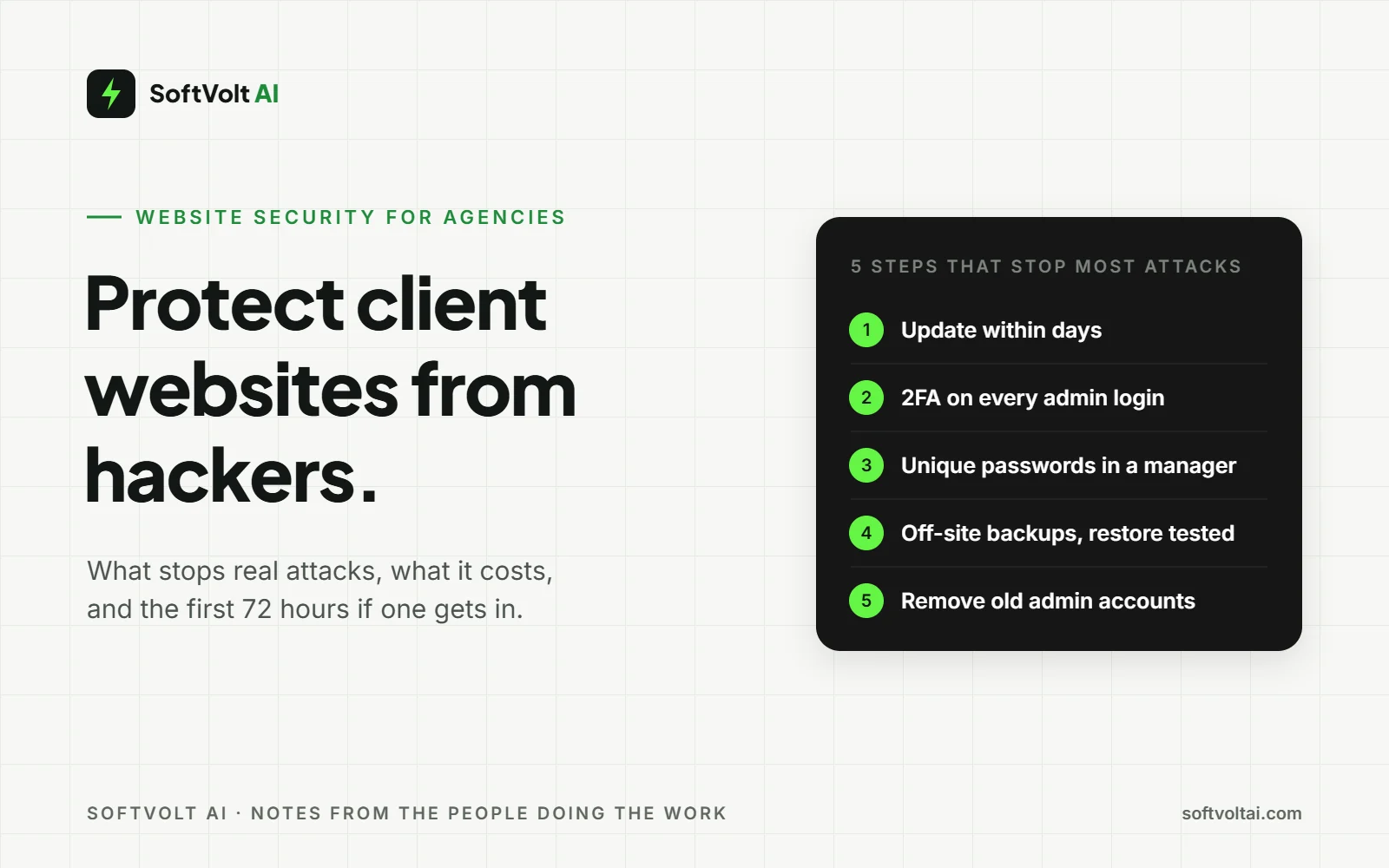
Quick answer: keep every piece of software on a client site updated within days, not months. Put two-factor authentication and a unique password on every admin account, the hosting panel and the domain registrar. Take backups that live off the server, and restore one to prove it works. Those three things stop most attacks on small business sites. Then write down who does what in the first 72 hours, because UK law puts a clock on it.
How often do UK businesses actually get attacked?
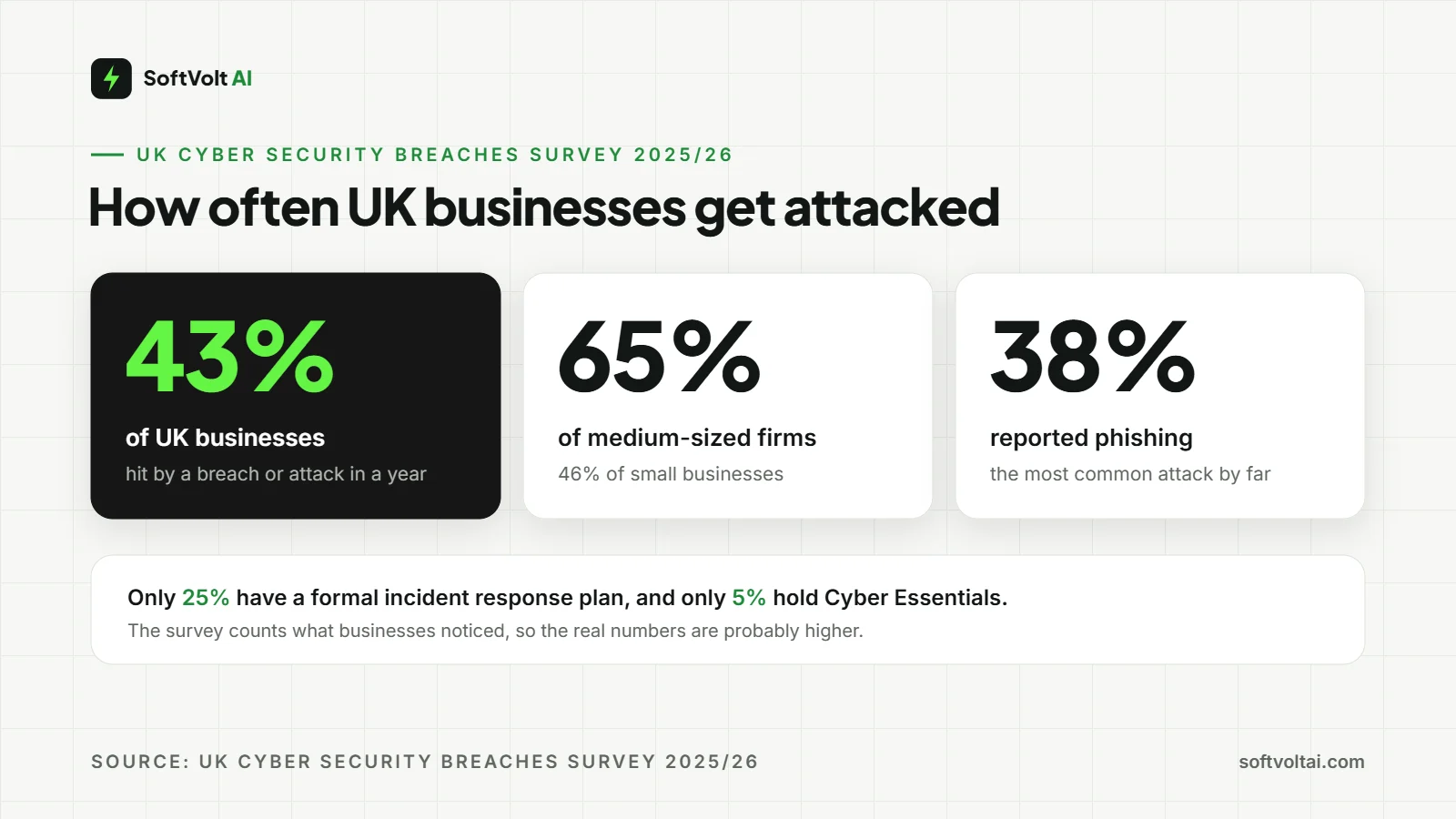
More often than most clients think, and the UK government measures it every year. These figures come from the Cyber Security Breaches Survey 2025/26, published on 30 April 2026:
- 43% of UK businesses identified a cyber breach or attack in the previous 12 months. For small businesses it was 46%, and for medium-sized firms 65%.
- Phishing was the most common attack, reported by 38% of businesses. On a website, that usually means someone on the client’s team typing a password into a fake login page, and that same password opens the site.
- Only 25% of businesses have a formal incident response plan, and only 5% hold Cyber Essentials certification.
The survey counts what businesses noticed, so firms without monitoring under-report. The real number is probably higher, not lower.
How do client websites get hacked?
Almost never by a person targeting that client. Most attacks are scripts that scan millions of sites for one known weakness, and a site is hit because it matched, not because anyone chose it.
The weakness is usually one of four things: a plugin or theme with a published flaw that has not been updated; a password reused somewhere else that leaked; an admin account belonging to a former employee or a previous agency that was never removed; or a shared hosting account where one neglected site infects every other site on it.
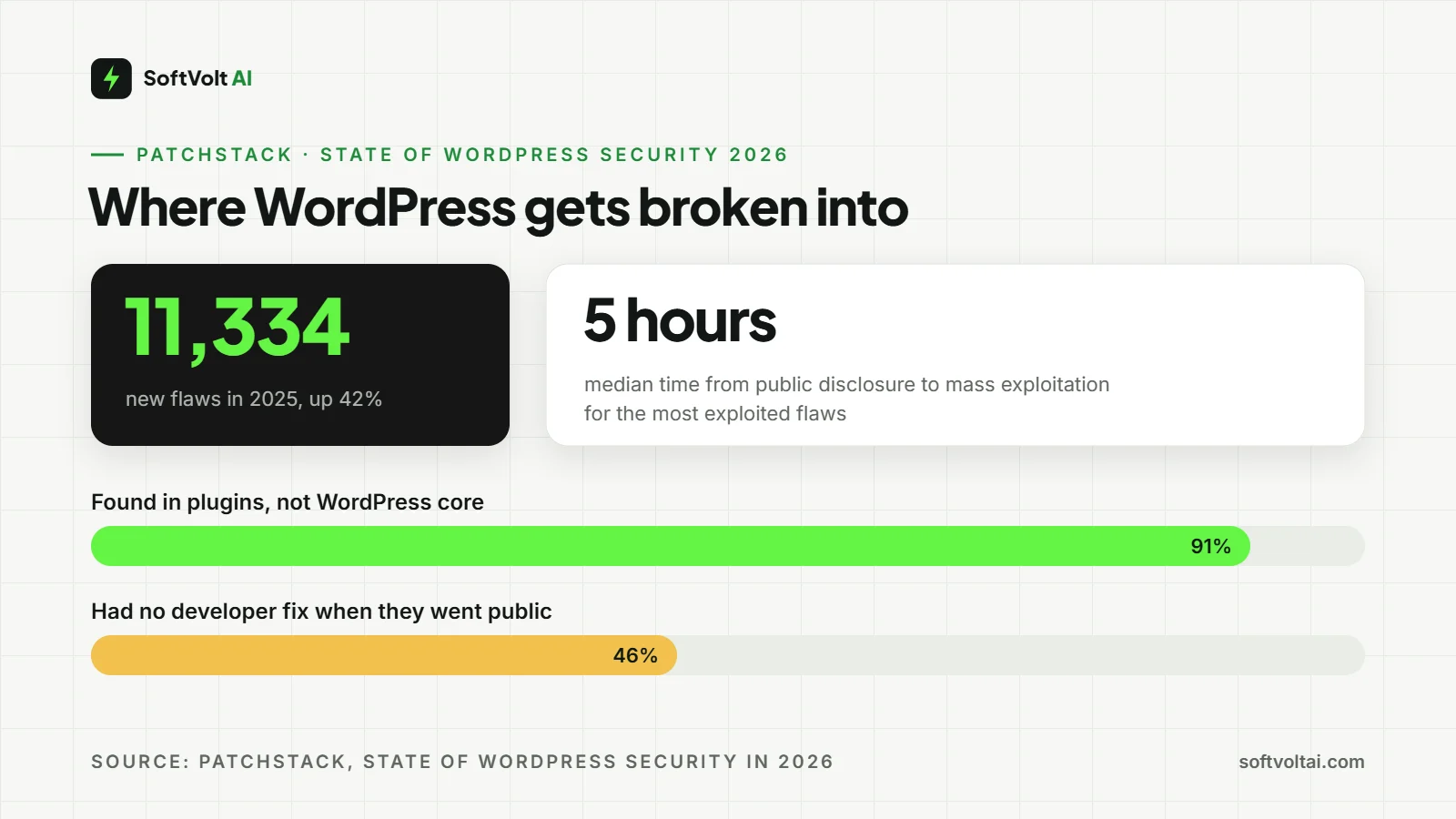
Patchstack’s State of WordPress Security in 2026 report counted 11,334 new WordPress vulnerabilities disclosed in 2025, up 42% on 2024, and 91% of them were in plugins rather than WordPress core. For the most heavily exploited flaws, the median time from public disclosure to mass exploitation was five hours, and 46% of vulnerabilities had no developer fix available when they went public. Patchstack sells security tooling, so treat the total as their count, but the direction is not in dispute.
So “we update client sites once a quarter” means those sites are exposed for most of the year, and a plugin nobody maintains any more cannot be fixed at all. A contact form plugin last updated in 2023, still active on a site that otherwise looks fine, is exactly the open window these scans look for.
Security reports name the attacks in jargon. Here they are in plain English, with the step further down that stops each one. It is a useful table to drop into a client proposal.
| Attack | What it means | What stops it |
|---|---|---|
| Brute force | A bot tries thousands of passwords on the login page | Steps 3 and 4 (2FA, login limits) |
| Phishing | Someone is tricked into typing a password into a fake page | Steps 3 and 9 (2FA, email records) |
| Plugin or theme exploit | A published flaw in out-of-date software | Steps 1 and 2 (remove, update) |
| SQL injection | Code typed into a form or URL makes the database hand over or change data | Steps 2 and 10 (updates, firewall) |
| Cross-site scripting (XSS) | Code planted on pages runs in visitors’ browsers, often to steal logins or redirect them | Steps 2 and 10 |
| Malicious file upload | A form that accepts attachments is used to upload a script | Step 10 (upload rules) |
| DDoS | A flood of fake traffic knocks the site offline | Step 10 (traffic filtering) |
What do attackers want from a small business site? Rarely the data alone. Hacked sites get used to host spam pages, redirect visitors, send phishing emails, mine cryptocurrency or attack other sites. A client’s site is useful to them because people trust it, not because it is famous.
What a hack does to a client’s Google rankings
This is the part clients feel most, and hosting guides rarely mention it. Hackers often add spam pages or links, and Google’s Security Issues report in Search Console lists that as hacked content, alongside malware and social engineering. Once Google flags a page, it can carry a warning in search results, and visitors may hit a full-page browser warning before they reach it. Either one kills clicks.
Getting the warning lifted is a job in itself: fix every listed issue on every affected page, press Request Review and explain what was done. Google says reviews typically take a few days to a few weeks. So verify every client site in Search Console now, before anything goes wrong, because you can only see that report for a verified property. If a client’s rankings fall and nobody can see why, check that report first.
What security plugins and firewalls do well, and what they cannot stop
A good security plugin or web application firewall is worth having on every client site. It is not the whole answer, and the sales pages do not say where it stops.
What they handle well:
- Blocking repeated login attempts and known bad IP addresses.
- Catching the injection attacks scanners throw at every site.
- Virtual patching: some firewalls push a rule that blocks a known attack on a plugin before its developer ships a fix. That is the only cover for the 46% of flaws with no fix at disclosure, so check whether yours does it. If not, deactivate or replace the plugin until the fix lands.
- Scanning files for malware and flagging changed core files, and keeping a log.
What still needs a person:
- Broken access control, which Patchstack names as the most exploited flaw type of 2025, because the malicious request looks legitimate.
- Phishing. No plugin stops a client’s bookkeeper typing the admin password into a fake login page.
- Removing old accounts, abandoned plugins and forgotten test sites, which is a decision rather than a scan.
- The domain registrar and DNS. If someone takes over the domain, the site can be spotless and still point somewhere else.
- Deciding whether a breach is reportable. Software cannot do that, and the ICO expects someone to.
If a provider says their plugin makes a site unhackable, that is the moment to stop listening.
What does protecting a client website cost?
Less than clients fear, and most of the bill is time rather than money. Here is what a typical UK small business site needs. Prices were checked on the seller’s own page in October 2026 and exclude VAT.
| Measure | Typical cost | Time and who does it |
|---|---|---|
| Two-factor authentication | Free | 10 minutes per account |
| Password manager | Free tiers exist, paid plans vary | An afternoon to move everyone over |
| Updates and off-site backups | Included with good hosting or a care plan | Weekly, or part of a maintenance plan |
| Security plugin or firewall | Free versions available, paid tiers vary | An hour to set up, then a monthly log review |
| Cyber Essentials certification | £320 plus VAT a year for 0 to 9 staff (IASME, October 2026) | A self-assessment, renewed annually |
| Cleaning up after a hack | Varies with the damage, plus lost trade | A specialist, working under pressure |
For an agency, the real cost is the weekly updates and tested backups across every client. That is the line item a white-label maintenance plan takes off your team, and it is easy to resell at a healthy margin.
Which protection should you do first?
Do them in this order. The first four are the quick answer, row by row, and they stop most attacks on small business sites. The last four are the ones most checklists skip.
| Order | Measure | What it stops |
|---|---|---|
| 1 | Update within days, remove what is not used | Automated scans finding last week’s plugin flaw |
| 2 | 2FA on admin, hosting and registrar | A leaked or phished password being enough on its own |
| 3 | Unique passwords in a manager | One breach elsewhere opening the site |
| 4 | Off-site backups, restore tested | A hack becoming a rebuild |
| 5 | Audit admin accounts quarterly | An ex-employee or old agency login being the way in |
| 6 | Lock the domain, add SPF, DKIM and DMARC | The domain being taken, or criminals emailing as the client |
| 7 | One site per hosting account, no stale test sites | A forgotten staging copy infecting the live site |
| 8 | A written 72-hour plan | Panic, and a missed ICO deadline |
Protecting a website from hackers, step by step
Each step says what “done” looks like, because “we have a security plugin” and “the client is protected” are not the same sentence. Each one also fits neatly into a monthly maintenance report.
1. List what is installed and remove what is not used
Every plugin, theme and integration. Done means nothing on the list has gone more than a year without a developer update, and anything nobody can name a reason for is deleted, not just deactivated.
2. Turn on automatic updates, or book a weekly slot
The test: a plugin flaw disclosed on Monday is patched on every client site by Friday. Most agencies cannot keep that promise across a full roster in-house, which is exactly why white-label maintenance exists.
3. Put 2FA on every account that can change the site
WordPress admin, hosting control panel, domain registrar, and the email address those accounts reset through. The NCSC is blunt about email: it is the key to everything else, so it gets a unique password and 2-step verification first.
4. Limit login attempts and move the login page
Lock someone out after three failed logins for a short spell, not for good, so a client who mistypes can try again later. Moving the login away from /wp-admin or /wp-login.php cuts bot traffic further, but a hidden address only hides the door. Treat it as an extra on top of 2FA, never instead of it, and record the new address in the client’s handover notes.
5. Move every login into a password manager
Done means no password appears twice, and nobody on the client’s team knows the admin password by heart.
6. Audit the user list
Every admin account belongs to a named person who still works with the client, and former staff and former agencies are gone. In our experience, this is the step most often left open when a site changes agency.
7. Set up backups that leave the server, then restore one
A backup stored on the same hosting account dies with it. You are done when you have watched a copy of the site come back up on a staging domain from last week’s backup. Until then, you have a file, not a backup.
8. Lock the domain and check who can touch DNS
Turn on the registrar’s transfer lock, add 2FA, and make sure the renewal card is not an ex-employee’s. A lapsed domain is the quietest way for a client to lose a website.
9. Set up SPF, DKIM and DMARC
These DNS records tell other mail servers which senders are really the client, so criminals find it much harder to send phishing that looks like it came from them. The NCSC advises starting DMARC on a policy of “none”, which reports problems without blocking anything, then tightening it. Done means a DMARC checker shows all three records on the domain.
10. Add a firewall and read its log monthly
A service in front of the site, such as Cloudflare, or the host’s own firewall can filter floods of fake traffic before they reach the server. If any form accepts uploads, limit file types, cap the size and scan what comes in. It only counts if someone opens the log, sees what was blocked and knows what normal looks like for that site.
11. Write the 72-hour plan on one page
Who calls whom, where the backups are, how to put the site into maintenance mode, and the ICO’s number. For an agency, add one more line: who tells the client, and what they say.
What UK rules apply if a client’s website is hacked?
A hacked site can be a legal problem as well as a technical one. If it held or passed on customer data, UK GDPR starts a clock. The client is the data controller, but they will look to you for the facts.
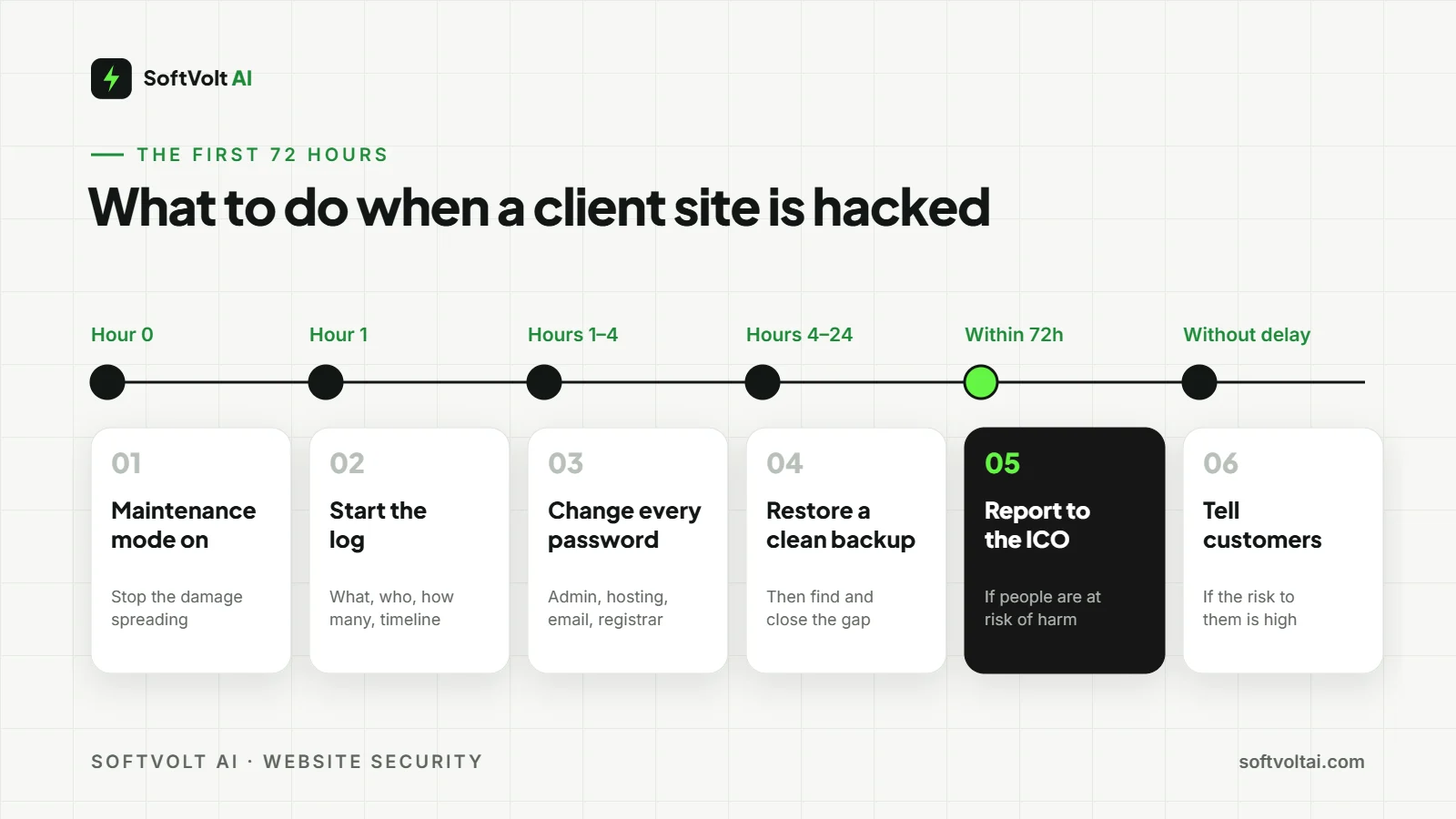
- When to report. A personal data breach must be reported to the ICO within 72 hours of discovering it, if it carries a risk of harm to the people affected. The clock runs from discovery, not from the attack. A defaced homepage with no customer data behind it may not be reportable; a hacked booking form or shop almost certainly is.
- What to write down. Start a log from the first hour: what happened, who is affected and how many, a timeline, and what has been done. The ICO asks for it if you report, and the client’s insurer will want it either way.
- Telling customers. If the risk to them is high, such as card details or login credentials, they must be told without undue delay and given specific advice, like changing passwords.
- Containing it, in order. The NCSC’s response guide runs prepare, identify, resolve, report, learn. For a website: maintenance mode on, change every password including hosting and email, restore from a clean backup, then find and close the gap before switching the site back on. Restoring without finding the gap just books the same hack for next month.
If you are already dealing with one, our WordPress malware removal workflow walks through the clean-up itself.
Frequently asked questions
Is a free SSL certificate enough?
For a brochure site or a standard shop, the free certificate most hosts provide gives the same encryption as a paid one. SSL protects data in transit; it does nothing to stop a plugin flaw or a stolen password, which is where most small business hacks start.
Does any of this apply to Shopify or Wix client sites?
Less of it. The platform handles core updates, hosting and much of the firewalling. The client still owns the admin passwords, 2FA, the domain registrar, the staff accounts and the apps they install, and phishing works just as well against a Shopify login.
How do I know if a client site has already been hacked?
Common signs are admin users nobody created, pages or links nobody added, spam titles for the site in Google, visitors reporting redirects, or a browser warning on the domain. A security plugin’s file change report and the Security Issues report in Search Console are the quickest checks.
Does a small business need Cyber Essentials?
Not for the website alone. Cyber Essentials covers the whole business, from laptops to email. It becomes worth the £320 plus VAT when a contract asks for it, or when a client wants an outside checklist that forces the basics to happen every year. Cyber Essentials Plus adds an independent technical check.
How often should client sites be backed up and updated?
Back up as often as the site changes: daily at least for a shop taking orders, weekly for a brochure site, as long as copies leave the server. Update within a week of a release, and the same day for anything marked as a security fix. The five-hour median to mass exploitation in Patchstack’s data is the reason.
Let us carry the security work for your clients
We look after WordPress and WooCommerce sites for agencies, under your brand. Updates within days, tested off-site backups, monthly security reports your client sees with your logo on, and a calm clean-up if something does get through.
- See our white-label website maintenance plans.
- Already hacked? Our WordPress security and malware clean-up service turns it around quietly.
- Or send us a brief with the sites you want covered.
Comments
No comments yet. Yours would be the first.
Leave a comment
Your email is not published. Comments are read before they appear, so give it a few hours.